

- Product
Kindling
Product Overview
Sophisticated security with unmatched simplicityCloud SIEM
Pre-configured detections across your environmentHoneypots
Deception technology to detect lateral movementEndpoint Visibility
Real-time monitoring with added detection & responseSecurity Reports
Data visualizations, compliance reports, and executive summariesAutomated Response
Detect, prioritize, and neutralize threats around the clockIntegrations
Cloud, on-prem, and open API connectionsXDR Platform
A complete view to identify risk, and things operational
- Pricing
- Why Blumira
Why Blumira
The Security Operations platform IT teams loveWatch A Demo
See Blumira in action and how it builds operational resilienceUse Cases
A unified security solution for every challengePricing
Unlimited data and predictable pricing structureCompany
Our human-centered approach to cybersecurityCompare Blumira
Find out how Blumira stacks up to similar security toolsIntegrations
Cloud, on-prem, and open API connectionsCustomer Stories
Learn how others like you found success with Blumira
- Solutions
- Partners
- Resources
THREAT ADVISORY
Microsoft Teams Cross-Tenant Helpdesk Impersonation Leading to Credential Theft & Data Exfiltration
|
SEVERITY High / Active Campaign |
PUBLISHED June 5, 2026 |
CATEGORY Social Engineering / Initial Access |
PLATFORMS Microsoft 365 · Windows |
EXECUTIVE SUMMARY
Blumira’s Security Operations team has been tracking an active campaign in which threat actors impersonate IT helpdesk personnel via Microsoft Teams to socially engineer victims into granting remote access through Quick Assist. We successfully replicated the full attack chain in a controlled lab environment to understand its behavior end-to-end, and have since detected and disrupted multiple real-world attempts before they could progress beyond initial access. The attack chain relies entirely on legitimate collaboration tools and native Windows protocols. This advisory documents how the technique works, what we observed, and what organizations should do now to reduce their exposure.
01 Threat Actor — Attribution & Infrastructure
In our lab replication of this attack, threat actors are operating Microsoft Teams accounts presenting as “Help Desk” from an external trial tenant, contacting multiple users over a 13-minute window. Trial tenants are deliberately chosen — they enable rapid account creation with no vetting. The indicators below are drawn from our lab environment and corroborated against real-world attempts we detected and stopped before they could progress through the full kill chain.
|
Field |
Value |
|
Attacker Account |
ithelpdesk8@kilan.onmicrosoft[.]com |
|
Display Name |
Help Desk |
|
Source IP |
194.26.229[.]22 — Russia (VirusTotal: Flagged) |
|
C2 IP #1 |
2600:1407:7400:18b::356e (port 80, cloud-hosted CDN range) |
|
C2 IP #2 |
2606:4700:4408::ac40:9517 (port 80, Cloudflare range) |
|
Exfiltration |
Rclone → External Cloud Storage |
Note: The C2 IPv6 addresses had no VirusTotal hits at time of analysis. They appear to be cloud-hosted ranges used to blend C2 traffic into legitimate CDN activity. The initiating IP 194.26.229[.]22 is confirmed malicious.
02 Intrusion Timeline
All times UTC. The following timeline reflects our controlled lab replication of this attack, which allowed us to document the full kill chain end-to-end. In real-world detections, Blumira disrupted attempts at the initial access and reconnaissance stages — before credential dumping or lateral movement could occur. From first Teams contact to interactive endpoint access: 21 minutes.
|
16:53 – 17:06 |
Initial Teams Contact & Vishing Attacker account ithelpdesk8@kilan.onmicrosoft.com initiates Teams chats and voice/video calls with multiple users posing as IT helpdesk. In two calls the attacker transmitted live video. Recipients received unsolicited spam floods prior to contact — a deliberate lure to manufacture urgency and make the helpdesk call feel credible. |
|
17:14 |
Quick Assist Access Granted Endpoint activity begins. A victim grants the attacker remote access via Quick Assist, giving full interactive desktop control. This step completes in under one minute after the user is walked through the approval prompts by the attacker. |
|
17:14 – 17:16 |
Rapid Domain Reconnaissance net.exe group /dom is executed five times in under two minutes via PowerShell, enumerating domain groups. Windows Terminal (wt.exe) spawns PowerShell; Remote Desktop (mstsc.exe) is launched directly from PowerShell. This burst pattern is the clearest behavioral signal in the chain. |
|
Shortly After |
Credential Dumping & C2 Established PowerShell initiates outbound connections on port 80 to two IPv6 C2 addresses. Credential dumping occurs. Payload staging begins in C:\ProgramData with DLL sideloading via trusted binaries. Encrypted configuration is written to the user registry for persistence. |
|
Post-Pivot |
Lateral Movement, RMM Deployment & Exfiltration Using harvested credentials, the attacker pivots via WinRM (TCP 5985) to domain controllers and identity infrastructure. Commercial RMM software is installed remotely via msiexec.exe for persistent secondary access. Rclone exfiltrates targeted documents to external cloud storage with file-type exclusions to minimize detection. |
03 Intrusion Playbook — Stage by Stage
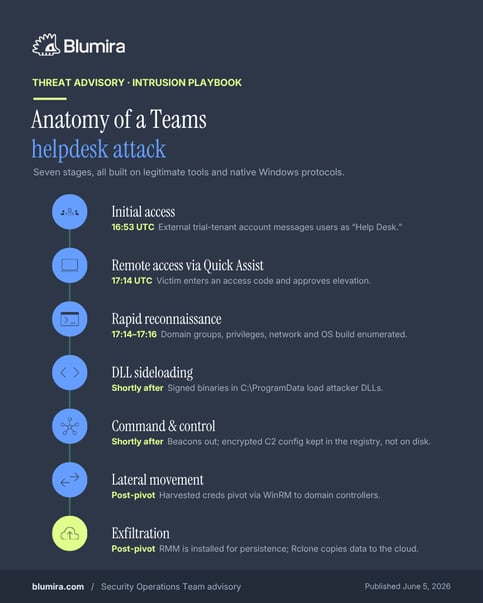
This campaign follows a structured, human-operated playbook documented independently by Microsoft’s Defender Security Research Team across multiple intrusions. Each stage builds on the last using legitimate tools and native protocols.
|
# |
Stage |
Description |
|
1 |
Initial Access |
Attacker contacts victims from an external M365 trial tenant displaying as “Help Desk.” Spam floods arrive first to create urgency, then a Teams message or call follows. Microsoft Teams external-sender warnings appear at each step — the attack succeeds only when users bypass them. |
|
2 |
Remote Access via Quick Assist |
The victim is convinced to open Quick Assist, enter an access code, and approve elevation prompts. Full interactive desktop access is established in under one minute. |
|
3 |
Rapid Reconnaissance |
Within 30–120 seconds: domain group queries (net group /dom), privilege checks (whoami /all), network discovery (ipconfig /all, arp -a), and OS build queries via registry. |
|
4 |
DLL Sideloading |
A staging bundle drops into C:\ProgramData. Legitimate signed executables — AcroServicesUpdater2_x64.exe, ADNotificationManager.exe, DlpUserAgent.exe — sideload attacker-supplied DLLs, running malicious code under trusted signatures. |
|
5 |
Command & Control |
Sideloaded component beacons outbound HTTPS to attacker infrastructure. Encrypted C2 config stored in user-context registry (not disk) to reduce forensic visibility. |
|
6 |
Lateral Movement |
Using harvested credentials, attacker pivots via WinRM (TCP 5985) to domain controllers and identity infrastructure — credential-backed, protocol-native, blends into normal admin traffic. |
|
7 |
Exfiltration |
Commercial RMM software installed via msiexec.exe for persistent secondary access. Rclone systematically transfers targeted documents to external cloud storage with file-type exclusions. |
04 Indicators of Compromise
The following indicators were captured during our lab replication of this attack and corroborated against real-world detection telemetry. IPs are defanged with brackets to prevent accidental clicks. Network defenders should hunt for these patterns within their environments.
|
Type |
Indicator |
Context |
|
IP — Attacker |
194.26.229[.]22 |
Source of all Teams messages; Russia-geolocated; VirusTotal flagged |
|
IP — C2 |
2600:1407:7400:18b::356e |
Outbound PowerShell C2, port 80; cloud-hosted CDN range |
|
IP — C2 |
2606:4700:4408::ac40:9517 |
Outbound PowerShell C2, port 80; Cloudflare range |
|
Account |
ithelpdesk8@kilan.onmicrosoft[.]com |
Attacker Teams account; display name: “Help Desk”; cross-tenant trial |
|
Process |
QuickAssist.exe → cmd.exe / powershell.exe |
Quick Assist spawning shell — high-fidelity malicious indicator |
|
Command |
net.exe group /dom (×5 in <2 min) |
Domain group enumeration burst immediately post-access |
|
Process |
wt.exe → powershell.exe |
Windows Terminal spawning PowerShell in attacker session |
|
Command |
mstsc.exe (from PowerShell) |
RDP launched from attacker-controlled shell |
|
Process |
AcroServicesUpdater2_x64.exe |
Sideload host; beacons to C2 over HTTPS; staged in ProgramData |
|
Process |
rclone.exe |
Targeted data exfiltration to external cloud; treat any execution as critical |
05 Recommended Actions
Blumira is actively alerting on these reported actions, but for security practitioners outside of the Blumira customer-base, please see our steps below:
Priority Notice: Organizations using Microsoft Teams with default external access settings are currently exposed. User education and Teams external access restrictions are the two highest-leverage changes and should be implemented immediately.
01. Restrict Microsoft Teams external access
By default, Teams allows communication with all external Microsoft 365 tenants. In the Teams Admin Center (Users → External Access), scope this to an explicit allowlist of trusted partners, or block all external domains if cross-tenant collaboration is not required.
Reference: learn.microsoft.com/en-us/microsoftteams/trusted-organizations-external-meetings-chat
02. Block federation with trial-only tenants
Run: Set-CsTenantFederationConfiguration -ExternalAccessWithTrialTenants "Blocked". In both our lab replication and real-world detections, attacker accounts operated from trial tenants. This PowerShell setting is not enabled by default and closes a common initial access vector.
03. Harden Microsoft Entra ID External Identities settings
Restrict guest invite permissions to the Guest Inviter role, limit external collaboration to approved domains, and scope SharePoint/OneDrive sharing to existing guests only. Reference: learn.microsoft.com/en-us/entra/architecture/9-secure-access-teams-sharepoint
04. Educate users — the single most important control
Train employees to: treat unsolicited Teams contact claiming to be IT helpdesk as suspicious; always check the external sender label; understand that real IT will never contact them from an @*.onmicrosoft.com domain; know that spam floods followed by a Teams call is a compound attack indicator. Consider establishing a verbal helpdesk passphrase.
05. Restrict or monitor Quick Assist and RMM tools
Quick Assist should only be used when IT explicitly initiates it. If unused, block the binary via policy. Alert immediately on QuickAssist.exe spawning child processes (cmd.exe, powershell.exe) — this is a high-confidence malicious indicator.
06. Enable Safe Links for Teams and Zero-Hour Auto Purge (ZAP)
Microsoft Defender for Office 365 can inspect links in Teams conversations at time-of-click and retroactively quarantine malicious messages. Confirm both features are active in your tenant.
07. Enforce MFA and Conditional Access for administrative roles
Lateral movement in this campaign was credential-backed. Phishing-resistant MFA (FIDO2/passkeys) combined with Conditional Access requiring compliant devices for WinRM and domain controller access significantly raises the cost of post-compromise pivoting.
08. Alert on Rclone and unauthorized sync tooling
Rclone is not a common enterprise tool. Any execution of rclone.exe — especially with --config rclone_uploader.conf or high-concurrency transfer flags — should trigger an immediate critical alert. Hunt for it proactively in your environment now.
06 References
Microsoft Security Blog — Cross-tenant helpdesk impersonation to data exfiltration: A human-operated intrusion playbook (April 18, 2026)
https://www.microsoft.com/en-us/security/blog/2026/04/18/crosstenant-helpdesk-impersonation-data-exfiltration-human-operated-intrusion-playbook/
Microsoft Entra — Secure external access to Microsoft Teams, SharePoint, and OneDrive
https://learn.microsoft.com/en-us/entra/architecture/9-secure-access-teams-sharepoint
Microsoft Teams Admin — Manage external meetings and chat with trusted organizations
https://learn.microsoft.com/en-us/microsoftteams/trusted-organizations-external-meetings-chat?tabs=organization-settings
© 2026 Blumira, Inc. — blumira.com
More from the blog
View All Posts
Security Alerts
10 min read
| November 23, 2021
Zero-Day Windows Vulnerability for Admin Rights
Read More
Blog
7 min read
| December 5, 2024
Protect Your Microsoft 365 Ecosystem from Third-Party App Risks
Read More
Security Alerts
6 min read
| December 14, 2020
What You Need to Know: SolarWinds Supply Chain Malware Campaign
Read More