

- Product
Kindling
Product Overview
Sophisticated security with unmatched simplicityCloud SIEM
Pre-configured detections across your environmentHoneypots
Deception technology to detect lateral movementEndpoint Visibility
Real-time monitoring with added detection & responseSecurity Reports
Data visualizations, compliance reports, and executive summariesAutomated Response
Detect, prioritize, and neutralize threats around the clockIntegrations
Cloud, on-prem, and open API connectionsXDR Platform
A complete view to identify risk, and things operational
- Pricing
- Why Blumira
Why Blumira
The Security Operations platform IT teams loveWatch A Demo
See Blumira in action and how it builds operational resilienceUse Cases
A unified security solution for every challengePricing
Unlimited data and predictable pricing structureCompany
Our human-centered approach to cybersecurityCompare Blumira
Find out how Blumira stacks up to similar security toolsIntegrations
Cloud, on-prem, and open API connectionsCustomer Stories
Learn how others like you found success with Blumira
- Solutions
- Partners
- Resources
Tell me if this sounds familiar: accounting reached out with a ticket about a new system they purchased and needed to be implemented by the end of the week. You get minimal details and it looks like you need to create a new service account on the server for it to handle several different scheduled jobs. Just a normal Thursday to you, right? The concern over time is how many of these accounts have you and your team created and left running with no real governance on them.
With these accounts not behaving like humans, their behaviors are harder to detect and require a separate set of rules to follow on protecting your environments. Understanding what a service account is and their purpose will help ensure that you implement the right security around service accounts.
What are Service Accounts?
A service account is a non-human identity account used by applications, automated processes, or machines instead of a human user. These accounts grant limited role permissions to authenticate and interact with a system, API, or set of resources.”
These are the accounts IT teams rely on to help keep applications and automated processes working on a daily basis to help with their ever expanding workloads. With the changing workloads, we are now creating accounts at every layer of your technical stack and leads to more opportunities of security exposures.
Types of Service Accounts
Local Service Accounts: These are the accounts that are running on servers with permissions defined to the specific endpoint that they are running on. Even with them restricted to endpoints, they can be given local admin rights so attackers still target these accounts.
Domain Service Accounts: Similar to local accounts, but they are given permissions at the domain level. Added permissions to these accounts since narrowing the scope to minimum can be difficult.
Cloud Service Accounts: Used across different platforms (AWS, GCP, Azure), they are implemented in different ways but each can cause exposure if compromised to your most sensitive data.
Risk Factors for Service Accounts
There are several risk factors with your services accounts that make them valuable targets for attackers. If we can understand these factors, it will lead to correctly applying the rules needed to protect against these attackers.
Default Permissions - Most products will require the account to have administrative rights, so that has led it to be the default configuration for most service accounts. A compromised service account with elevated permissions can be catastrophic, at any layer in your environment.
Lack of Credential Rotation - These accounts are notorious for not rotating their credentials after being created. Standard practice is to set them to not expire and just keep the saved password for your team to record.
Avoids Behavioral Detection - Services accounts are designed to run 24/7 in most cases and are not attempting to login frequently. With any notices of changes in behavior on the account, will most likely mean the compromise has happened.
How to Secure Service Accounts
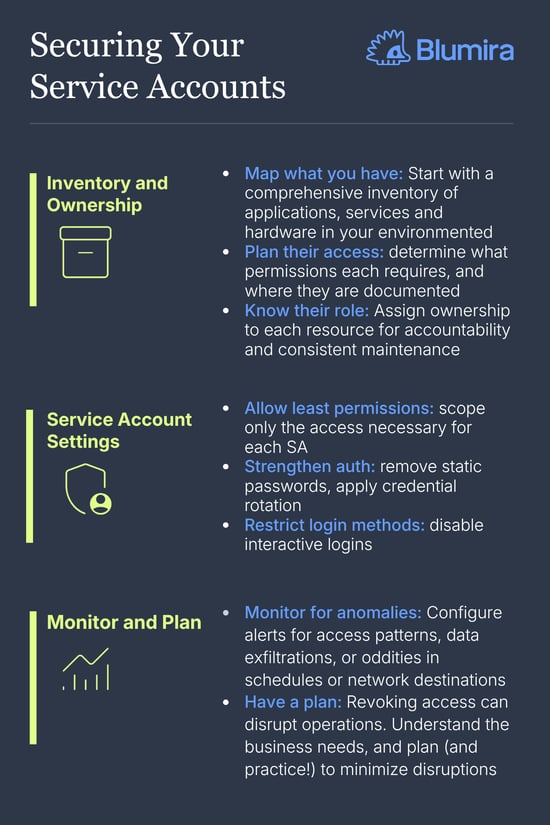
Implementing a plan to govern and protect your service accounts will help keep your environment and users safe. Standardizing the plan as well will help with IT team changes and future deployments of these accounts.
1. Inventory and Ownership
Start by going through discovery of all your environments and inventory what you have in place. This should include what applications or services these are being used for, what permissions they have and any documentation required for these accounts.
After Inventory, assigning ownership of the accounts will create accountability and lead to proper maintenance of these accounts. If someone is in charge of them, they will receive the attention that is needed to keep them secure.
2. Service Account Settings
The default approach to scoping a service account is following the principle of least privilege. They should just have the exact permission needed, instead of giving them more access than necessary just to resolve a temporary issue.
You’ll also want to remove static passwords (if supported) and apply credential rotation. Some cloud services that allow rotation, but for your local accounts you need to setup a schedule and stick to it.
Disabling interactive logins is also a way to protect service accounts. No reason to have someone able to sign in with that service account.
3. Monitor and Plan
As part of your security, you will need to monitor these accounts for various reasons. Setting up alerts for access patterns, data exfiltrations, or oddities in schedules or network destinations.
Your team should have a plan in place already for incident response on compromised service accounts. Simply revoking the account can break business systems and lead to hits on revenue. Your team needs to work with your businesses to understand the speed that needs to happen when developing your playbooks.
What to Remember
It's easy to overlook your service accounts in your environment: from the necessity of setting up several for different applications and automations, years of software implementations, and the ever expanding need to add more and more to your environments. Setting up rules in place to help with accountability, governance, and workbooks will reduce your risk profile and strengthen the other security controls you have in place. And as a bonus, you’ll feel better about your user security!
More from the blog
View All Posts
Security How-To
8 min read
| October 25, 2024
How MDR Services Leave Your Organization Vulnerable
Read More
MSP
14 min read
| December 4, 2025
A Guide for MSPs: Building a Profitable Security Service
Read More
Security Trends and Info
7 min read
| March 27, 2024
3 Ways Blumira Benefits Modern Financial Services Organizations
Read More