

- Product
Kindling
Product Overview
Sophisticated security with unmatched simplicityCloud SIEM
Pre-configured detections across your environmentHoneypots
Deception technology to detect lateral movementEndpoint Visibility
Real-time monitoring with added detection & responseSecurity Reports
Data visualizations, compliance reports, and executive summariesAutomated Response
Detect, prioritize, and neutralize threats around the clockIntegrations
Cloud, on-prem, and open API connectionsXDR Platform
A complete view to identify risk, and things operational
- Pricing
- Why Blumira
Why Blumira
The Security Operations platform IT teams loveWatch A Demo
See Blumira in action and how it builds operational resilienceUse Cases
A unified security solution for every challengePricing
Unlimited data and predictable pricing structureCompany
Our human-centered approach to cybersecurityCompare Blumira
Find out how Blumira stacks up to similar security toolsIntegrations
Cloud, on-prem, and open API connectionsCustomer Stories
Learn how others like you found success with Blumira
- Solutions
- Partners
- Resources
November 8, 2022
When a cybersecurity incident occurs, logs are the key to understanding what happened. But managing and retaining those logs can become unwieldy, especially for larger environments.
Developing a log management strategy can help you to understand how to properly retain logs, as well as how long you need to retain them for.
Log Types
First, it’s important to understand the different types of log files that an environment generates.
- Access logs. These logs contain login information, including users that accessed specific files or programs.
- Server logs. These logs track activity on a specific server, whether it’s a web server, application server, or file server.
- Event logs. These logs capture a variety of activities from network traffic, including login attempts, application events, API requests, and more. Event log is also a component of Microsoft Windows Event Viewer, but the term is used generically across all operating systems.
- Audit logs. Audit log, also called audit trail, is a type of event log that is a record of events and changes. It generally captures a specific sequence of events, who performed an activity and how the system responded.
- System logs. System logs, also known as syslog, refers to a log of activity generated by the operating system, whether that is Windows, Linux, or MacOS. This activity can include system modifications, startup notifications, errors, and more.
Why Do You Need To Retain Security Logs?
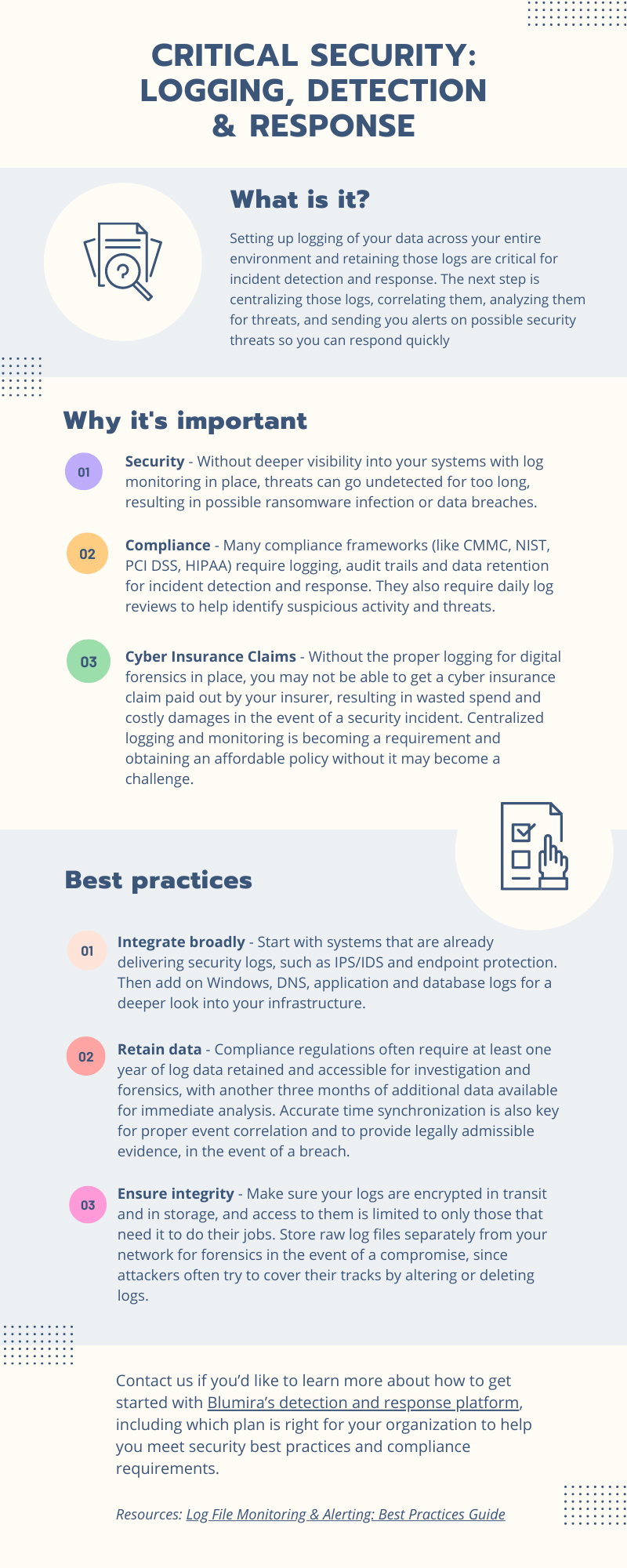
Log retention policies, or how long to store logs, depends on business needs and specific compliance requirements. However, retaining security logs for some period of time is generally a good idea for most organizations.
- Streamlines Incident Response
Without robust historical log data, incident responders — the team that investigates what happened leading up to, during, and after a security event — won’t have the necessary data to work with.
Logs provide a very accurate picture of an attacker’s initial access, when they first entered, what systems the attacker touched, and what data they accessed.
When an organization has a SIEM that retains log data for at least 90 days — or even better, six months to a year — the incident response team can more easily determine how long an attacker was in an environment, further easing the incident response process.
- Obtain a Cyber Insurance Policy
Cyber insurance companies often require organizations to retain logs for a certain period of time in order to obtain coverage. That’s because insurers want to limit their losses as much as possible.
After a cyberattack, cyber insurance companies often hire external parties such as legal teams and digital forensics and incident response (DFIR) firms to understand the scope of the attack.
Without proper log retention, those external parties will take longer to do their jobs, thus their services will be more expensive — negatively impacting the insurance company’s bottom line. Lack of adequate logging can also make it difficult to determine the scope of a breach, which can further elevate costs for the business and insurer.
- Meet Compliance Requirements
If your organization needs to meet a compliance framework, there’s a good chance that retaining logs is a requirement. Different compliance frameworks have different retention period recommendations:
It’s important to check the specific log retention requirements of the compliance framework you’re working with.
Log Retention Best Practices
Perform an Asset Inventory
First things first: where are you gathering logs from? Without a hardware and software inventory, you may be overlooking crucial log sources. Not only is an asset inventory important for log monitoring, but it can help you to get started with maturing your information security program — you can’t secure what you don’t know is there.
If you don’t know how to get started with an asset inventory, public cloud services offer a good starting point. Public cloud services can be higher risk because you can’t just unplug them like a server. Gather every service that users need to log into, such as Windows accounts, Microsoft 365, Paypal, etc. Recording that information can be as simple as using an Excel spreadsheet, but paid asset management platforms offer more robust features.
Determine What To Log
Logging every single event from every workstation within your environment is complicated to do on your own, and can result in labor challenges for your IT team, as it often presents storage, data transmission, and maintenance challenges. Plus, if you use a commercial SIEM solution, your licensing costs could quickly get out of control — although this isn’t an issue for Blumira customers.
A good method is to consume logs more aggressively from high-value systems, high-risk systems, and those facing external networks. For example, application logs, firewall logs, DNS, and authentication logs can all offer useful information from a security perspective, as well as logs from sources such as an intrusion detection system (IDS)/ intrusion prevention system (IPS). Then you can save in areas that tend to be noisier, such as account lockouts.
Learn What Log Sources You Should Prioritize >
Centralize Your Logs
Gathering Windows Event Viewer logs from every endpoint is often an impossible task, even for smaller environments. Windows Event Viewer is also clunky and difficult to work with; it can’t provide real visibility into the processes within your machines.
That’s why the most important log retention best practice is to archive logs into a central repository, such as a security information and event management (SIEM) platform. A SIEM not only collects logs, but it correlates logs and other security-related documentation for analysis.
Retain Logs Offsite
Attackers commonly hide their tracks by modifying, deleting or destroying logs. For example, if an attacker gained access to an elevated user account, they may lock up log files or delete temporary accounts that they used in the attack.
That’s why it’s important for a SIEM to store logs immutably and offsite, meaning that they cannot be changed or deleted.
Keep Event Log Data ‘Hot’ When Possible
When retaining logs, it’s important to consider where you’ll be storing them. The average time to initially detect a breach is 212 days, according to IBM. Keeping security event logs in hot storage, however, can aid organizations in investigation once a breach is discovered.
Hot storage can be accessed quickly, either on a solid-state drive (SSD) or in the public cloud, while cold “cheap and deep” storage, like object storage, is archived and rarely accessed.
Not only is hot storage important from a cybersecurity perspective, but it’s a requirement for certain compliance frameworks. PCI DSS, for example, specifies all logs from in-scope systems to be retained “hot” for three months and in some other accessible format for 12 months or a year.
To store hot data, you can use a service such as Azure Hot Blobs or AWS, or a cloud SIEM. These services don’t come cheap, however, and many SIEM vendors only offer a limited amount of hot storage. Blumira, on the other hand, retains one year of hot storage by default on Cloud and Advanced Editions.
Consider a SIEM with Built-in Retention
The easiest method to retain logs, especially for smaller IT and security teams, is to send logs to a cloud SIEM. This prevents you from having to purchase and configure storage or deal with public cloud expenses.
But sending logs to a SIEM can also be a costly solution, as many vendors charge based on log ingestion and don’t retain log data by default. Or a vendor may retain a limited amount of data, such as 30 days — which is often too limited of a retention policy for organizations that need to be compliant.
It’s important to look for a solution that offers a flat fee and retains at least one year of data by default, such as Blumira.
How Blumira Handles Log Retention
Blumira retains one year of data by default in our Cloud and Advanced editions, so there’s no need to export logs every three months and store them in a different location.
Access and review all of your current and past findings with our convenient portal, offered as part of your flat fee, subscription-based pricing model. Other SIEM providers charge their customers if they want to access their own logs.
We protect log data both in transit and at rest to ensure attackers cannot gain access to log archives to read data without the appropriate keys. The Blumira log database is only accessible to internal Blumira services and parties that require access.
We also maintain raw log data while tracking and identifying log messages to ensure data integrity and validation. Through periodic review and internal processes, we validate that incoming logs have not been tampered with, while alerting customers if any workstation/server audit logs are cleared.
Blumira: Beyond Log Retention
Blumira is much more than a centralized log repository. We’re dedicated to helping small teams achieve easy-to-use, effective security that meets compliance and protects them against security incidents such as breaches and ransomware. We do things differently by providing more value for better security outcomes, including:
- Automate Tasks For You – We do all the heavy lifting for your team to save them time, including parsing, creating native third-party integrations, and testing and tuning detection rules to reduce noisy alerts.
- Faster Time to Security – Our unique approach to detections notifies you of threats other security tools may miss, sending you real-time alerts in under a minute of initial detection to help you respond to threats faster than ever.
- Easily Meet Compliance – With a year of data retention and deployment that takes minutes to hours, we help you meet cyber insurance and compliance easily and quickly with the team you have today.
Blumira’s free edition integrates directly with your Microsoft 365 tenant to detect suspicious activity in your environment — at no cost. Get your free account and see the value of Blumira today.
More from the blog
View All Posts
Security How-To
20 min read
| November 15, 2022
A Guide To Microsoft Azure Security Logging
Read More
Security How-To
15 min read
| November 22, 2022
Office 365 Audit Log Retention: Why It Matters and Best Practices
Read More
Blumira News
4 min read
| January 17, 2023
Blumira Agent: SMB Endpoint Security
Read More